The Importance of Defining Lifecycle Contacts
Introduction to RevOps
| Lifecycle | Name | When to Enroll a User |
|---|---|---|
| 1st | Contact | When a new user enters your system and the relationship has not yet been defined. |
| 2nd | Lead-Prospect | When the contact is part of your target companies/organizations or fits your Ideal Customer Profile (ICP) or Ideal Opportunity Profile (IOP). |
| 3rd | Engaged | When the prospect has interacted with your business through any channel or touchpoint. |
| 4th | Deal Process (MQL-SQL-CQL) | When there are active engagements, such as discovery calls or messages, and a deal has been created for these contacts/companies and other buyer groups. |
| 5th | Ideal | When the deal has gone dark, is on hold, or was lost, but the prospect showed some interest and may be considered an opportunity in the future. |
| 6th | Customer | When the deal has been successfully closed, and the prospect becomes a customer. |
| 7th | Old Customer | When the project has been completed, and there is no ongoing relationship with the customer. |
| 8th | Partner | When there is a collaborative relationship rather than a traditional buyer-seller dynamic, such as partnerships or alliances. |
The Role of Lifecycle Contacts in CRM
Targeted Communication
Understanding where a contact stands in their lifecycle allows for tailored communication strategies. For instance, the messaging for a 'Lead-Prospect' will differ significantly from that for an 'Old Customer'.
Efficient Resource Allocation
By categorizing contacts, businesses can allocate resources more efficiently. High-priority leads or prospects can be targeted with more intensive marketing efforts, while customers can be nurtured for upsell opportunities.
Enhanced Marketing Strategies
Lifecycle definitions enable more precise marketing campaigns. For example, 'Engaged' contacts can be targeted with content that pushes them further down the sales funnel, while 'Deal Process' contacts can receive personalized follow-ups to close the sale.
Improved Data Management
Segmentation of contacts helps in managing data more effectively, reducing the risk of data silos and ensuring that all teams have access to relevant information.
Revenue Optimization
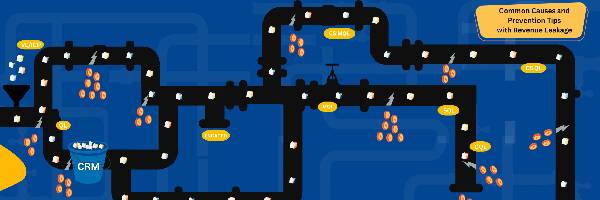
By clearly defining lifecycle stages, businesses can identify and address revenue leakage points, ensuring that potential sales opportunities are not lost due to miscommunication or lack of follow-up.
Introducing the 'Partner' Lifecycle Contact
Unifying Lifecycle Elements
The 'Partner' lifecycle stage acknowledges the importance of collaborations that do not fit into traditional buyer-seller dynamics. This category includes relationships that may involve mutual business growth, co-marketing efforts, or strategic alliances. By defining this lifecycle stage, businesses can ensure that these valuable partnerships are managed effectively, with appropriate communication and collaboration strategies.
Addressing Revenue Leakage
Revenue leakage often occurs when potential opportunities are not fully explored or when existing relationships are not nurtured adequately. By categorizing contacts as 'Partners', businesses can focus on developing these relationships further, exploring new revenue streams, and maximizing the potential of collaborative efforts.
Mitigating Data Silos
Data silos occur when information is not shared across departments, leading to inefficiencies and missed opportunities. The 'Partner' lifecycle stage encourages a more holistic view of relationships, ensuring that all relevant data is accessible to teams involved in managing these collaborations. This approach helps in creating a unified strategy for managing partnerships, reducing the risk of fragmented information.
Enhancing Performance
Integrating the 'Partner' lifecycle stage can lead to improved overall performance by fostering stronger relationships and ensuring that all interactions are strategically aligned with business goals. This stage also allows businesses to measure the impact of partnerships more accurately, leading to better decision-making and more effective resource allocation.
How to Implement Lifecycle Contact Definitions in HubSpot
Initial Setup
Define each lifecycle stage clearly and ensure that all team members understand the criteria for categorizing contacts. This step involves setting up properties in HubSpot to track the lifecycle stage of each contact.
Data Segmentation
Segment your contact database according to the defined lifecycle stages. This process may involve importing existing data into HubSpot and categorizing contacts based on their current relationship with your business.
Automation
Utilize HubSpot’s automation tools to manage lifecycle stages. For example, create workflows that automatically move contacts to the next lifecycle stage based on their interactions with your business.
Customized Communication
Develop communication strategies tailored to each lifecycle stage. This involves creating targeted email campaigns, personalized content, and specific follow-up strategies for different types of contacts.
Continuous Monitoring
Regularly review and update lifecycle stages to ensure they reflect the current status of each contact. This ongoing process helps in maintaining accurate data and optimizing your CRM strategy.
The Role of Lifecycle Definitions in Supporting Automation Campaigns
Supporting Automation Campaigns
Personalized Communication
By categorizing contacts into specific lifecycle stages, automation campaigns can deliver personalized messages that resonate with the recipient's current status. For instance, an 'Engaged' prospect can receive nurturing emails, while a 'Deal Process' contact can get follow-ups designed to close the sale.
Targeted Marketing
Automation campaigns can be tailored to target specific lifecycle stages, ensuring that marketing efforts are focused on the right audience. This targeted approach increases the effectiveness of campaigns and improves conversion rates.
Efficient Lead Management
Lifecycle definitions help automate the movement of contacts through the sales funnel. For example, when a 'Lead-Prospect' engages with your content, they can be automatically moved to the 'Engaged' stage and receive the appropriate follow-up actions.
Resource Allocation
Automation can prioritize contacts based on their lifecycle stage, ensuring that high-value leads receive more attention and resources. This prioritization helps in managing workload and maximizing the impact of your efforts.
Tracking and Analysis
Defining lifecycle stages allows for better tracking and analysis of contact interactions. Automation tools can generate reports on how contacts move through the stages, providing insights into the effectiveness of your strategies and areas for improvement.
Supporting Automation Campaigns
- Ensure that automation campaigns are precisely targeted and timed.
- Help maintain a cohesive and consistent approach to managing customer relationships.
- Provide a clear framework for measuring success and identifying opportunities for optimization.